


Download Screen Recorder HD Pro – Free HD Screen Capture Tool for Windows, Mac, Android, iOS
Overview
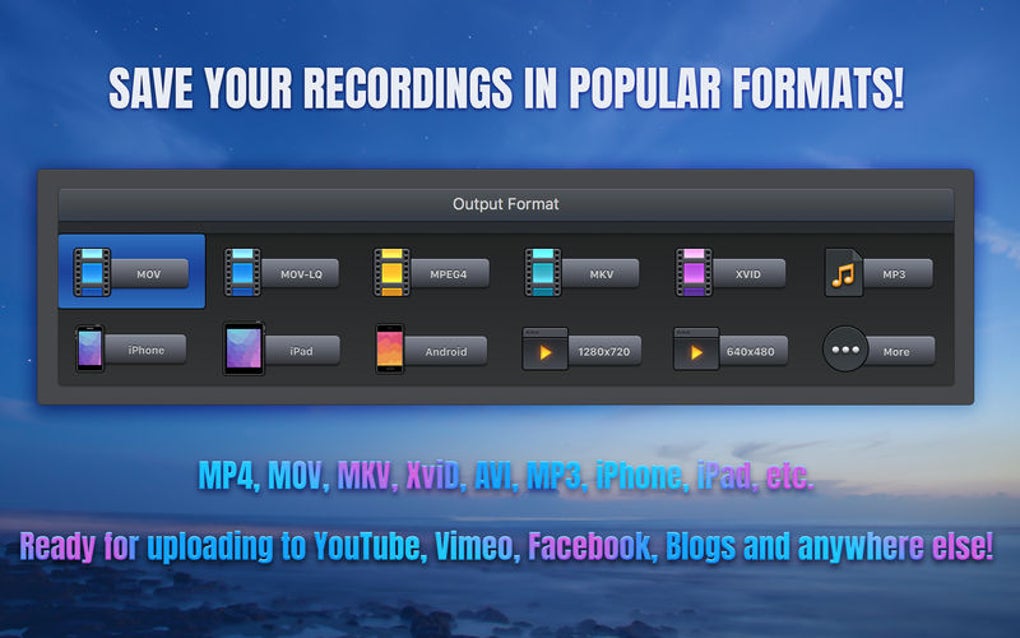
Screen Recorder HD Pro is a robust, high‑definition screen capture application designed for users who need reliable, crystal‑clear recordings of any on‑screen activity. Whether you are creating tutorial videos, capturing gameplay, or preserving a live webinar, this tool lets you record the entire display or a precisely selected region with minimal performance impact. The program supports a wide array of output formats—including MP4, AVI, MKV, and MOV—so you can choose the best codec for your workflow.
In addition to video, Screen Recorder HD Pro offers flexible audio options: you can capture system sound, add a voice‑over through a microphone, or blend both for a professional narration. While the interface may require a brief learning curve compared with some one‑click recorders, the depth of features—such as timed recordings, frame‑by‑frame editing, and customizable hotkeys—makes it an excellent choice for power users and creators who value control over their recordings. Security is also a priority; all recordings are saved locally, and the software does not embed any hidden telemetry, ensuring that your captured content remains private.
Whether you are on a Windows PC, a macOS laptop, an Android tablet, or an iOS device, Screen Recorder HD Pro delivers a seamless, high‑quality recording experience that scales with your needs.
Key Features & Capabilities
- Full‑screen and custom‑area recording with pixel‑perfect selection.
- Support for multiple video containers: MP4, AVI, MKV, MOV, FLV.
- Audio capture options: system sound, microphone narration, or both.
- Timed recording function for automated start/stop after a set interval.
- Adjustable frame rate up to 60 fps for smooth motion capture.
- Built‑in video editor for trimming, cropping, and adding watermarks.
- Hotkey configuration for instant start, pause, and stop.
- GPU acceleration to reduce CPU load during high‑resolution capture.
- Export presets optimized for YouTube, Vimeo, and social media platforms.
- Secure local storage with optional password‑protected folders.
The feature set of Screen Recorder HD Pro is tailored to meet the expectations of both casual users and professional creators. The ability to select a custom recording region is especially valuable when you need to focus on a specific application window without exposing the rest of your desktop. Video format flexibility ensures compatibility with most editing suites and playback devices, while the high frame‑rate option guarantees fluid motion for fast‑paced content such as gaming or UI demonstrations.
The timed recording function eliminates the need for manual intervention during long sessions, making it ideal for recording webinars, live streams, or scheduled system tests. Moreover, GPU acceleration leverages modern graphics cards to offload encoding tasks, resulting in smoother performance and lower power consumption. For creators who wish to polish their footage before publishing, the integrated editor provides essential tools without requiring third‑party software.
Finally, the security features—local storage and optional encryption—give peace of mind that sensitive recordings remain confidential.
Installation & Usage Guide
Step‑by‑Step Installation
Installing Screen Recorder HD Pro is straightforward across all supported platforms. Begin by downloading the installer from the official website; the file is signed and scanned for malware, guaranteeing a safe download. On Windows, run the .exe file and follow the wizard: accept the license agreement, choose an installation folder (the default is recommended for most users), and optionally create a desktop shortcut. macOS users will receive a .dmg image; double‑click it, drag the application to the Applications folder, and confirm any security prompts in System Preferences.
Android users can obtain the APK from the Play Store or sideload it by enabling “Install unknown apps” for the browser. iOS distribution is handled through the App Store; simply tap “Get” and authenticate with Face ID or your Apple ID. After installation, launch the program and grant the necessary permissions: screen recording, microphone access, and file system write permissions. These permissions are essential for capturing video and audio simultaneously.
Basic Recording Workflow
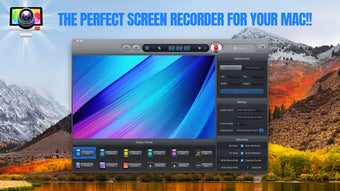
Once the application starts, you will be greeted by a clean dashboard. To begin a recording, click the red “Record” button or press the pre‑configured hotkey (default Ctrl + Shift + R on Windows, Cmd + Shift + R on macOS). A translucent overlay will appear, allowing you to choose between “Full Screen,” “Window,” or “Custom Area.” Drag the corners of the selection box to define the exact region you wish to capture.
Before hitting “Start,” you can enable audio sources by ticking “System Audio,” “Microphone,” or both, and adjust volume levels using the sliders. If you need to schedule a recording, open the “Timer” tab, set the start delay and duration, and click “Schedule.” During capture, the on‑screen timer displays elapsed time, and you can pause or stop at any moment using the hotkeys or the floating control panel. After finishing, the software automatically saves the file to the default output folder, which you can customize in the Settings menu.
From there, you can open the built‑in editor to trim unwanted sections, add annotations, or export to a different format for publishing.
Compatibility & System Requirements
Screen Recorder HD Pro is engineered to run natively on the most popular operating systems, ensuring a consistent experience whether you work on a desktop, laptop, tablet, or smartphone. The supported platforms include:
- Windows 10/11 (64‑bit) – Minimum 4 GB RAM, 1 GHz processor, DirectX 11 compatible GPU.
- macOS 11 (Big Sur) and later – Minimum 4 GB RAM, Intel Core i5 or Apple Silicon, Metal‑compatible GPU.
- Android 8.0 (Oreo) and above – Minimum 2 GB RAM, ARM Cortex‑A53 or higher, OpenGL ES 3.0.
- iOS 13 and later – Minimum 2 GB RAM, A9 chip or newer, Metal support.
The application leverages hardware acceleration whenever possible, so devices with modern GPUs benefit from smoother recordings and lower CPU usage. For users on older hardware, the software automatically falls back to software encoding, which may increase resource consumption but still delivers high‑quality output. Disk space requirements depend on the selected resolution and duration; a one‑hour 1080p recording in MP4 typically occupies around 2 GB.
It is advisable to maintain at least 5 GB of free space on the target drive to accommodate temporary cache files. Network connectivity is only required for the initial download and occasional update checks; all recordings are processed locally, guaranteeing privacy and offline usability. The program also supports multi‑monitor setups, allowing you to capture a single screen, a combined desktop, or a specific monitor without additional configuration.
Pros, Cons & Frequently Asked Questions
Pros
- High‑definition recording up to 60 fps with multiple output formats.
- Flexible audio capture (system, microphone, or both).
- Timed recording and hotkey support for hands‑free operation.
- GPU acceleration reduces CPU load on modern hardware.
- Built‑in editor for quick trimming and watermarking.
- Secure local storage with optional password protection.
- Cross‑platform availability (Windows, macOS, Android, iOS).
Cons
- Initial learning curve for users accustomed to one‑click recorders.
- No cloud sync or built‑in sharing platform.
- Advanced features such as scheduled recordings are only in the paid version.
- Limited customization of UI themes.
FAQ
Can I record 4K video with Screen Recorder HD Pro?
Yes, the software supports up to 4K resolution if your monitor and graphics card can output that resolution. You may need to increase the bitrate in the settings to maintain quality.
Is there a free version or trial available?
Screen Recorder HD Pro offers a fully functional free version with core recording capabilities. Advanced features like scheduled recordings and premium export presets are unlocked in the paid upgrade.
How does the software protect my recordings?
All recordings are saved locally on your device. You can enable password protection for specific folders, and the app does not upload any data to external servers unless you choose to share manually.
Can I capture audio from a video call while recording my screen?
Absolutely. Just enable the “System Audio” option before starting the recording, and the software will capture all sounds played through your speakers, including video‑call audio.
What formats can I export my recordings to?
The application supports MP4, AVI, MKV, MOV, and FLV. Export presets are available for popular platforms like YouTube, Vimeo, and Instagram.
Conclusion & Call to Action
Screen Recorder HD Pro stands out as a versatile, high‑performance solution for anyone who needs reliable screen capture in HD. Its extensive feature set—ranging from custom area selection and multi‑track audio to timed recordings and GPU‑accelerated encoding—makes it suitable for educators, gamers, marketers, and corporate trainers alike. While the interface may require a short adjustment period, the payoff is a level of control and output quality that many free alternatives simply cannot match. Security‑focused users will appreciate the local‑only storage and optional encryption, while cross‑platform support ensures that you can capture on virtually any device you own. If you are looking for a free, secure, and feature‑rich screen recorder that scales with your growing needs, download Screen Recorder HD Pro today and start creating professional‑grade videos in minutes.
$0 – Click here to download the free version now!
Pros: High‑resolution capture, flexible audio, GPU acceleration, cross‑platform.
Cons: Learning curve, limited UI theming, premium features behind a paywall.







